Let's Unpack This!
Posted In: Reflective posts
Unix
One of the classes I am taking this semester as part of my cybersecurity minor is TCMG 303 (Unix System Administration). I have weekly labs, and this week’s labs demonstrate files and folders.
Everything in Unix is considered to be a file. Unix uses a hierarchical structure to organize files that are similar to the way a filing cabinet works. The file cabinet itself is the holder of all information - it’s the base of the filing system. To find hiring information about a specific employee, for example, you need to locate the correct file cabinet, the right drawer in the cabinet, the correct folder in the drawer, and the correct page of information inside the folder.
In Unix operating systems, folders are usually referred to as directories. Generally, you will use a folder when referring to Finder-based views of the file and other GUI-based operations. You will use the term directory when referring to the terminal and other command-line operations. In the Unix log files, purple indicates a directory, and white indicates regular files.
In Unix, everything starts with the root directory, often designated only by /. All other files and directories originate there. The root directory generally includes a set of commonplaces, then subdirectories within those directories, etc. To find specific information in Unix, you need to locate the correct directory, the correct subdirectories, and the correct file.
The hierarchical structure in Unix is similar to an upside-down tree. In my TCMG 303 lab, I needed to install the tree application package in the terminal with the command sudo apt install tree. The tree tools allow me to display the complete directory tree from the current directory. After the tree application download complete, I need to execute command tree -d to display the hierarchical structure.
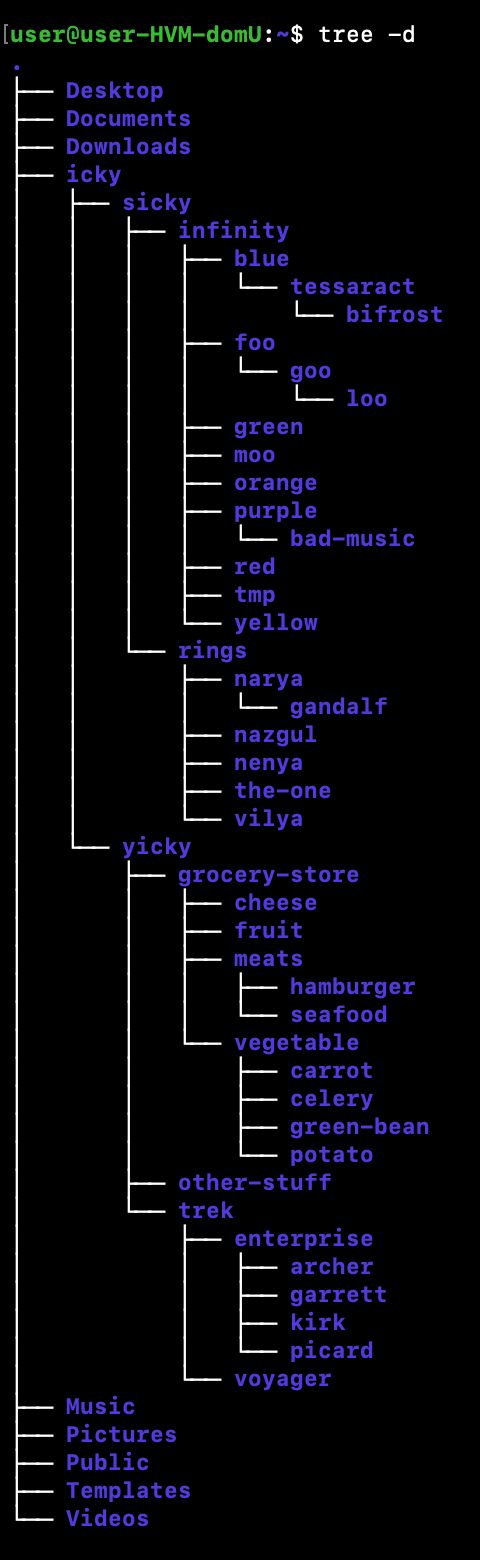
Question 6 of my TCMG 303 lab asked, “Create directories of carrot, potato, celery, and green-bean under the vegetable directory”.
To get to the vegetable directory, I need to follow the path by looking at the tree diagram. The directory is currently in /users/icky/yicky/grocery-store/vegetable. Where / is the root directory, user is a subdirectory of root, icky is a subdirectoy of user, yicky is a subdirectory of icky, grocery-store is a subdirectory of yicky, and vegetable is a subdirectory of grocery-store.
To change directory the command cd will move you to the directory identified. Therefore, cd icky takes me from user to the icky directory, cd yicky takes me from icky to yicky, cd grocery-store takes me from icky to grocery-store, cd vegetable takes me from grocery-store to vegetable. Once I am in the vegetable directory, I need to use mkdir to make a new directory (creates the specified directory). I needed to make four new directories under the names carrot, potato, celery, and green-bean. Therefore, I need to do mkdir carrot, mkdir potato, mkdir celery and mkdir green-bean. After I completed that, I command ls to list the contents of the directory specified to ensure that I did indeed correctly create the four new directories.
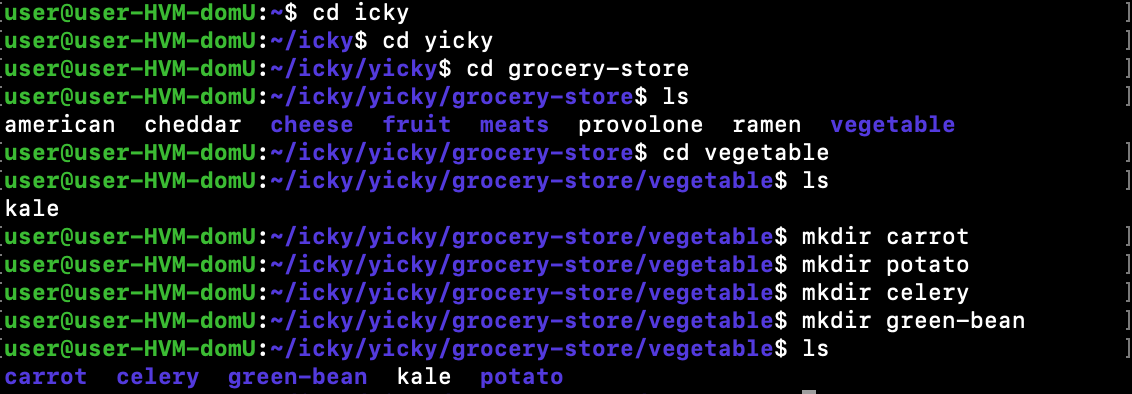
potato: icky/yicky/grocery-store/vegetable/potato
celery: icky/yicky/grocery-store/vegetable/celery
green-bean: icky/yicky/grocery-store/vegetable/green-bean